

1
Google Maps Leads Scraper
Scrape all local businesses data from a Google Maps Search URL and export into a Google Sheet. Emails included.
 10951 users
 5921 runs
Trusted worldwide by the best
Export leads from Google — right now
Stop wasting time on repetitive, error-prone, and time-consuming tasks.
Get it done fast and flawlessly.
Extract Leads
Capture Google Maps local businesses globally from any Google Maps search URL.

Find Emails
Retrieve publicly available emails from the business's official website.

Verify Emails
Instantly verify emails, boost deliverability and supercharge your outreach.

Download Data
Download data in an exhaustive, structured, and ready-to-use CSV format.

87 data attributes per lead
Every scrape returns structured data you can export as CSV, JSON, or via API.
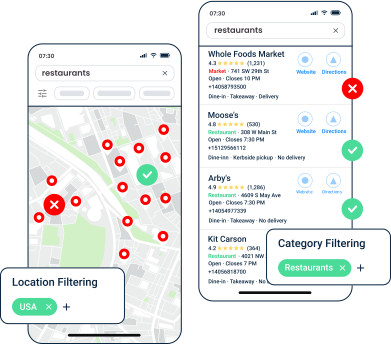
Whether the result passed your geo and category filters
Reasons why the result did not match your filters
Internal Google Maps hex identifier for the business
Google Maps unique numeric business identifier (CID)
Google Knowledge Graph ID of the business
Google Places API unique identifier for the business
Direct Google Maps URL to the business listing
Direct link to the business's Google reviews page
Business name as listed on Google Maps
Cleaned business name for email personalization (no punctuation or accents)

Fast
200 leads per minute
Lightning-fast performance

Solid
99.95% task success rate
Dependable, reliable data every time

Cost-competitive
$0.5 per 1000 leads
Top affordability worldwide
Built to run.
Most scrapers break in silence. This one doesn't — and we show it, openly.
incident-free runs · last 90 days
Tracked from every run. Incidents stay on the record even after they're fixed.
Trusted by the best
Used obsessively by the data-hungry around the world
Frequently Asked Questions
Why are some Google Maps results marked as "no match"?
MATCH FILTERS to TRUE or FALSE and explain why in NO MATCH REASONS (for example no_location_match). Turn on geo_match to remove out-of-area listings and avoid being billed for them.How does the scraper work with Smart Filters?
What data is collected for each business listing?
Do I get billed for duplicates or out-of-area results?
geo_match enabled, listings outside the 50 km radius are excluded and not billed.Can the scraper find emails and social links from websites?
Do you verify the emails you collect?
valid, risky or unknown. valid emails are about 97% accurate. More details here.